Our Philosophy on Website Design
Welcome
There are many different approaches to designing a web site and on this page we would like to discuss the differences between the way we do things and the other main methods. But first the available methods are:
- Some use programs like Adobe DreamWeaver to design the layout and to generate all the required source code and images.
- others use pre-defined applications such as Wordpress, Joomla or ZenCart to name just a few. These applications are all based around templates which control everything.
- Free web building websites like WIX. These offer fancy looking websites, but they are incredibly resource hungry, slow to load and do not support all browsers.
- Then there is the approach we prefer. To custom design everything by hand specifically to suit the customers requirements to ensure their website operates efficiently. We do not make you pick from a list of pre-defined website layouts (called templates), instead we discuss with you how you want your website to look and then make it happen.
If you have any questions or comments, please feel free to contact us. The fastest method is using our Contact us Form
Sections on this Page
 Custom Design Efficiency of Design Functionality of Design
Functionality Optimizing Images Photographing Products Editing and Enhancing Images
Comparison
PART ONE: WEB SITE DESIGN
Custom Design
Other online web builders like WIX can offer fancy looking website layouts reasonably easily, but they rely heavily on 3rd party resources, can be incredibly slow to load, hard for search engines to index and difficult to update.
So being able to code the complete web site in HTML (even using a simple editor like notepad) allows us to easily accomplish any layout design. We're limited only by our imagination, rather than the limitations of other programs or fixed template designs.
As internet devices change, and they have in the 20+ years we have been working in this industry, desktop monitor resolution has increased significantly and then with the introduction of more mobile devices, the resolution shrunk to something lower than we have ever seen before, so it is important for a website to utilize either all of the avaiable space, or be adaptive so that it can adjust to the viewers device in the most efficient manner. We choose to make all our applications adaptive using CSS (Content Style Sheet) coding because that is the fastest method available and means it does not reply upon javascript (which a user could have disabled), or JQuery which is just too heavy for performing such a simple task.
Not only do we make the pages adaptive, but we can give you a website which can switch between different styles between each different page. For example you may wish to display articles (like this one) in a page with a fixed width, so that your columns display nicely and that it presents as you have designed it. However you may have a page that lists products so for that page you could have it configured to use all available width in the visitors browser. An article using full width would look silly and a product list using limited width would look silly, so why chooe a CMS system that does exactly that? Our system gives you the ability to choose which pages are display in which format.
So not only do we give you Adaptive websites, but we also give you websites which can be floating as well.
Efficiency of Design

So our approach means the html files are smaller, which allows them to use less disk space, makes them much faster to load and most importantly means your site will require less bandwidth, saving you money.
Plus the added benefit means they are much easier to modify or update. So if you require updates or changes made, we can get them done very quickly, which is why our maintenance fees are so low. We are not relying on slow loading or expensive programs in order to make the changes for you.
Any images that we create for your web site are also optimized to ensure they use the least amount of disk space and bandwidth. We cover this in more detail further down on this page under Optimizing Images.
Not only do we optimize the images, but we also reduce the number of calls (requests) required by your website in order to display a single page. Where possible we manage the layout using CSS, but there are times you can't achieve what you need with CSS and therefore images are required. We design the layout in such a way that even if your website requires 20 images for a single page, the number of calls (requests) can be reduced to just a couple (not the full 20, as the default would be one call per image). The less calls (requests) your pages make to the server, the faster your web page loads and the more efficient it is.
Functionality of Design

It is our experience that people prefer a web site that is easier to understand and navigating between pages to display product information requiring the least number of clicks. Once at the product page, have most of that page dedicated to describing and detailing that product. This means they don't have to scroll as much either.
PART TWO: WEB SITE CONSTRUCTION
Functionality

Yet so many web sites have really small resolution images, which makes it very difficult to see what the product is like. It doesn't matter how much text description is there, people prefer pictures. So we ensure that the size of the images are large enough to adequately display your product with as much detail as possible. Also if you have numerous pictures of your products then we like to incorporate user interactive slide shows so your potential customers can select from a range of thumbnails which picture they wish to view.
So by ensuring the pages are not cluttered with unnecessary objects (Functionality of Design), we can make your product pictures as big as they need to be. In the picture example those flowers are very wide, but not very high, so by choosing a different page layout for that product, means we can utilize the full width of the browser window to show the picture in as much detail as possible. Each product can have its own picture resolution. Unlike template layouts where each product picture must be a fixed and set resolution, which then totally impacts on the aspect ratio of the picture (making it look too fat or too thin), or requires the picture be reduced in size so that it fits at the correct aspect ratio.
We don't use any plugins like Lightbox. Most people find that Lightbox is just a pain to use in the way it operates.
We think it is important to show your products as accurately and clearly as possible.
It is also worth mentioning in this section that some Web Design companies will design your web site using CMS (Content Management System), however it is then up to you to add all your content (such as all your products and services information). Now some customers may like the ability to manage their own content and add their own products, but it is our experience that the majority don't. They want someone else to do all of that work. We agree, so the web sites we design for our customers include adding all the required content.
Also with our Content Management Applications, our Image Manager will optimize and resize the images automatically and retain the correct aspect ratio. More about Ths in the next section.
Optimizing Images
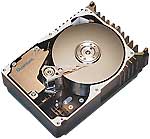
So we manually optimize each image individually to ensure that the maximum amount of detail is retained, but also ensuring the filesize remains small. We often use multiple image formats to ensure this, because each format has its own benefits depending on the image content.
The benefits of having optimized images are quite obvious. They will use much less disk space, they will be much faster to load and most importantly they will use less bandwidth, which will save you money. We can't stress enough, just how important this aspect is. Your web site visitors will not want to wait 20 seconds for just one large image to load, so we optimize all images to reduce the loading times as much as possible.
For our applications, we have developed our own Image Manager system. So if you are managing your own content and wish to upload images, then you can. Our Image Manager allows images to be uploaded all at different resolutions depending on what application the image is for (such as a news article, or a product record). So not only do you have that flexibility, but the uploader will also automatically resize the image to the required resolution AND retain the correct aspect ratio of the image and it will also optimize the image using jpeg compression. We even allow you to select what jpeg compression level you would like to use. This is beneficial if a specific image is very detailed, only the human eye will see if the quality is good enough, so we give you the option to adjust the compression if you feel the image should be a bit higher quality. We also give basic options to change brightness and sharpness from the upload section too.
All images uploaded have thumbnails generated so that you can either reference the thumbnails directly, or the applications will show the thumbnail instead of the full image reduced. That way the page with the images will load very fast and use less bandwidth because the full resolution image will only be displayed when clicked on by the visitor.
The last key point to make about image management is that most of our applications include a Display Order, so you can choose which images to display. This is beneficial if you upload numerous images you can choose which one of those to actually display on your website, without having to delete the images. Why is that beneficial? Well it means that if you don't need the image now, you don't have to delete it, but if you do need the image later, then it's already there, which saves you from having to upload it later.
This is just a few of the approaches we have for optimizing and managing images. If you want to know more, contact us.
Photographing Products
This is where we can help because we are all interested in photography and members of camera clubs in our areas. So why not let us help you by taking the photos for you. To see some examples of the photos we have taken for some of our existing clients you can visit the Photographic Services page on our website.
Editing and Enhancing Images

The only thing that can't be corrected is if the pictures are too out of focus. So if you wish to take your own photos the best bit of advice we can offer is USE A TRIPOD. If a tripod is unavailable then at the very least place the camera on a chair, table or box. Do not hold the camera. Second tip is where possible photograph in balanced light and if possible without using the inbuilt remedial "head on" flash.
|
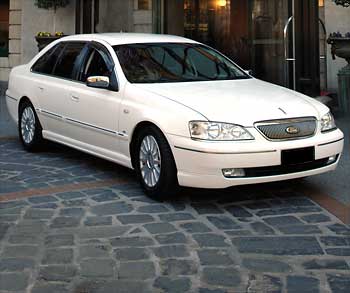
Here is an example where a reflection of the vehicle was required. This presented a slight challange due to the angle of the vehicle in the photo. Resolution of the edited image is 350 x 293 pixels. Filesize is 11.4KB |
|
This original image was quite good quality but still required adjustments to the colour balance, histogram and
exposure levels. Plus removal of the distracting background. Resolution of the edited image is 350 x 221 pixels. Filesize is 12.4KB |
|
|
Now you may also find yourself having to display an image of a product that also includes a company logo or brand
name that you do not have permission to use, or it could be that of a competitor, so as long as you have permission
to use the photo (if you didn't take it yourself), then we can edit out anything in the photo that you do not wish
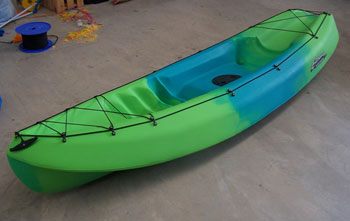
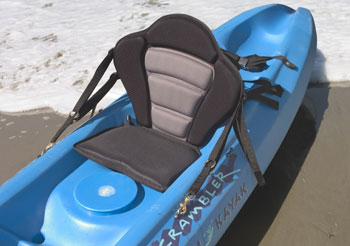
to display. Here you can see we have removed the background and the harsh shadow caused by photographing in direct sunlight, plus made adjustments to colour balance, histogram and exposure levels. We have also edited out the brand name listed on the side of the kayak, but still retained all the shadow, texture and colour of the kayak and seat. Resolution of the edited image is 350 x 246 pixels. Filesize is 9.7KB |
|
The final editing example. The standard digital camera has had a major problem here with exposure, so adjustments
were made to colour balance, white balance, histogram, exposure and contrast. Plus removal of the dark background. Clearly the camera flash could not cover much distance which has resulted in the background to be so dark. Plus that then completely blends all the dark green leaves of the floral arrangement.
Resolution of the edited image is 250 x 333 pixels. Filesize is 23.9KB |

|
We just can't stress enough how important good or high quality optimized images are to the presentation of your web site.
First impressions are the most important so if potential customers can't see your products clearly enough due to having small, low quality images, they will most likely choose to purchase from somewhere else. This could also happen if they can't work out how to navigate your web site if it is too "busy" or cluttered with unnecessary animations or adds.
So if any of the above issues are as important to you, as they are to us, then why not contact us for a no obligation free quote. Or you can goto our Packages page to get an idea of what we charge. The services we offer for the price we charge, I think you'll find hard to beat.
PART THREE: COMPARISON
Other Web Design Companies
Now we understand your time is valuable, so we thought it might be beneficial to you if we were to list some of the other Web Design companies around, so you can see what they are offering and then make your own comparisons to the value of services and features we can offer.We have just done a few google searches to find these companies. We have no association with any of them.
So keep in mind everything that we have mentioned above in Parts 1 and 2, but also a few other things to look for are: Cost of Domain Name Registration - Web Site Hosting Fees. - Do their web sites support multiple resolutions. As most people are moving to widescreen Flat Panel Monitors for their computers (or laptops), we think it is beneficial if the website can "float" or be displayed in full screen at any resolution. Finally do you have to add your own content?.
There is one final thing that is worth checking out. There is a good and quick way to check just how compatible some of these website companies are with their website designs. For those people using Firefox Click on Tools from the menu and then Error Console (or CTRL + SHIFT + J). If there are any entries in there click on clear, and then visit one of the below website companies. It will be inevitable that you will see a plethora of errors and warnings appear. This indicates that their own website is not designed to identify what browser you are using and to provide correct formatting accordingly. That does not demonstrate very good efficiency or compatibility, so it makes you wonder what other areas they choose to ignore when designing a website for you. We feel that sort of slack design is just not acceptable. If you are using Internet Explorer, sorry you can't do this test because Internet Explorer does not offer such a feature.
That concludes this article.
Thank you for reading